TL;DR - FINNS lays your Apple Watch and Galaxy Watch swim data across a five-channel multi-chart on a single screen — a swim-only log app. - iOS (SwimLog) v1.14 and Android (FINNS) v2.0 both run 100% on-device. No ads, no login, no forced cloud. - 240 medals, a six-stage evolving avatar, AI coach notes — the point is turning a "record" into a "story."
Why Another Swim App?
Picture the watch face of someone who swims. The workout ends, and a few numbers flash up: distance, time, average heart rate, SWOLF. That's it.
But the questions that follow are not the kind a summary screen can answer.
- "Why was my heart rate so high during today's 700m freestyle set?"
- "Compared to last week, did my pace actually get better or worse?"
- "How does a coached lesson compare to a free swim in terms of intensity?"
To answer any of these, you need to lay that session back out on a time axis — where the heart rate climbed, where the pace dropped, where the stroke changed. All at once. The built-in watch app does not go that far.
FINNS was built for exactly that one screen.
What FINNS Shows You
One swim, recorded by your watch, gets redrawn by the app like this.
Four-Channel Multi-Chart — One Time Axis, Four Views
- Stroke timeline — freestyle, backstroke, breaststroke, butterfly, and kickboard as colored bands
- Heart rate curve — Zones 1 through 5 color-separated
- Pace curve — per-lap pace normalized to 100m
- Strokes — how many strokes you took each lap
- SWOLF — stroke efficiency: how far you travel per stroke
Because all five graphs share the same time axis, cause-and-effect becomes visible: "the moment I switched to breaststroke, my heart rate dropped and my SWOLF improved." You see it, you don't have to guess at it.
AI Coach Notes — Sentences, Not Just Numbers
When a session ends, the app surfaces a one-liner.
- "Today was about recovery. Zone 2 made up 64% of your total time."
- "Your sprint intervals landed well. You hit Zone 5 three times."
The note is built from 12 swim personality types (endurance, sprinter, technician, all-rounder, and so on) combined with your weekly and monthly cumulative data. It is not a generic "good job."
240 Medals and a Six-Stage Evolving Avatar
- 30 medal categories × 8 tiers (Bronze → Silver → Gold → Platinum → Diamond → Master → Grandmaster → Legend) = 240 medals total.
- 100km cumulative freestyle. SWOLF average under 35 across 10 consecutive sessions. 30 dawn swims before 5 a.m. These are long-term challenges, the kind you can chase for years.
- The avatar slims down when you train and rounds out when you rest. It evolves through six stages, and you collect swimsuits, caps, goggles, watches, and gear through gacha — a wardrobe that fills up over time.
Lesson vs. Free Swim, Classified Automatically
- The app reads time-of-day and weekday patterns along with sensor gaps (wall turns, underwater sections) and labels each session on its own.
- Register your lesson schedule once and any workout that falls in that window is tagged as "lesson" automatically.
Workout Duration, Auto-Corrected
We've all done it — walked into the shower without stopping the watch, ended up with a 60-minute workout in the log. FINNS reads your heart rate curve and proposes "this is where the actual swim ended." A slider lets you fine-tune it by hand.
Share, Style, and Drill — What's New
You can now share your swim as a styled card or a session replay clip, and wrap up each month with a weekly or monthly report card. There's also a gear closet to organize your swimwear and log your daily look by date. The AI coach goes further too — beyond a one-liner, it now suggests targeted drills across eight training areas. (Each feature gets its own full walkthrough in the posts below.)
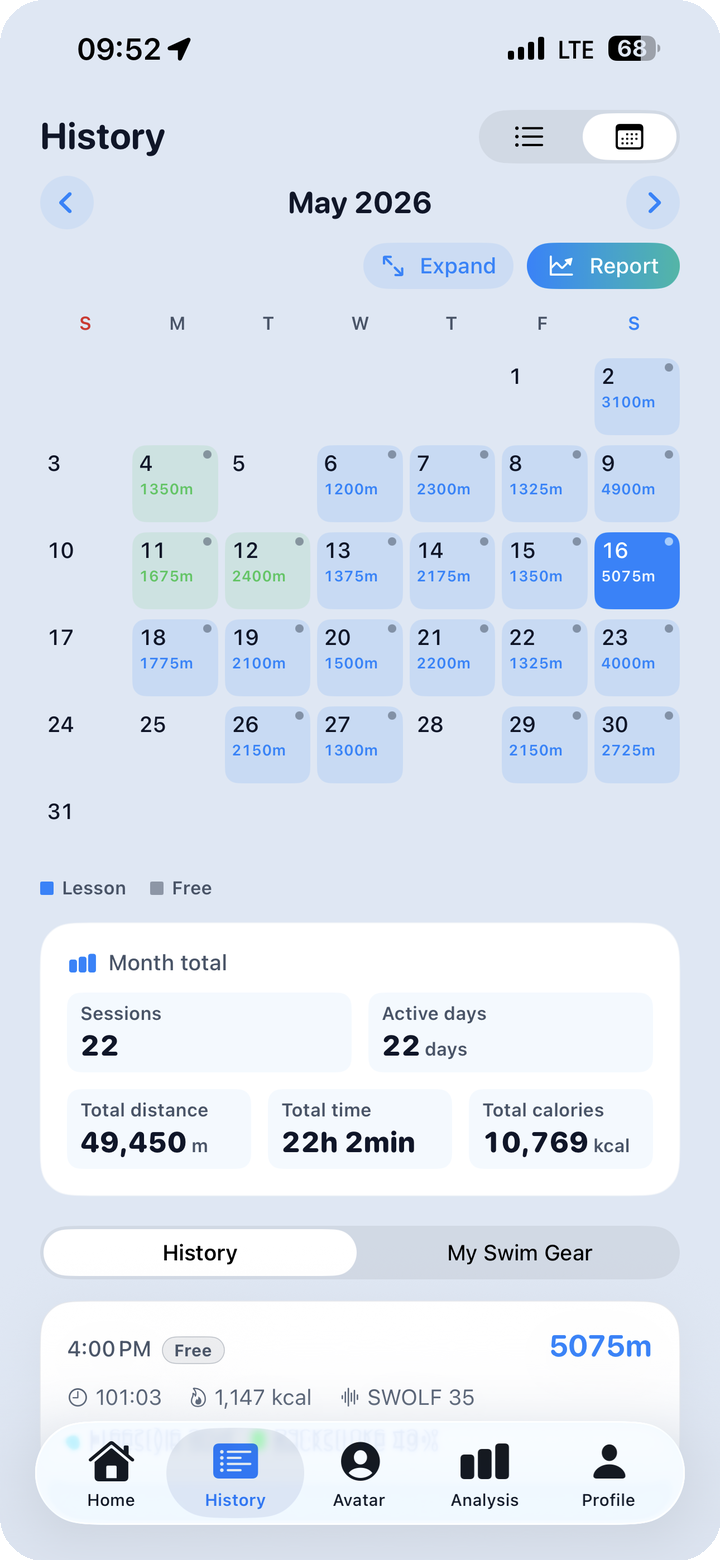
iOS and Android — Both Supported
| Platform | App name | Latest version | Data source | Recommended watch |
|---|---|---|---|---|
| iOS | SwimLog (FINNS) | v1.14 | Apple HealthKit | Apple Watch (Series 4+) |
| Android | FINNS | v2.0 | Samsung Health | Galaxy Watch (4+) |
Same analytic philosophy, same multi-chart, same medal system. The only thing that differs is the data pipeline behind each platform. A full side-by-side comparison lives in Post 6 — The Platform Feature Matrix.
What FINNS Promises — and What It Doesn't
What it promises
- Zero ads. No banners, no interstitials, no rewarded video.
- No login. No email, no social account. Just a nickname on first launch.
- 100% local storage. Every record lives on your device. Nothing is sent to a server.
- No tracking SDKs. No Facebook SDK, no Google Analytics, no third-party analytics.
- Free. All core features are free. No forced paywall.
What it doesn't promise
- Manual entry without a watch is not supported. FINNS analyzes data pulled from your Apple Watch or Galaxy Watch.
- iOS ↔ Android sync does not exist yet. Each platform is used independently.
- No other sports. No running, no cycling. This is a swim-only app.
Who This Is For
- Anyone swimming twice a week or more. The more data accumulates, the sharper the coach notes and analysis become.
- Lesson swimmers and Masters members. Stroke, SWOLF, and pace trends turn your coach's feedback into something you can verify with data.
- Solo swimmers. The AI coach and the medal system are what get you in the water on the days you'd rather not.
- Watch owners who want more than the watch gives. You already paid for the data. This is the screen your watch app doesn't render.
What's Next
This series runs across 11 posts.
- Main intro — you're reading it
- The limits of stock Apple Watch / Galaxy Watch swim tracking — what's missing
- The five-channel multi-chart — how to read one screen
- 240 medals and the evolving avatar — a motivation system that lasts
- AI coach + 12 swim personality types
- Share & Export — styled cards, session clips, monthly / weekly report cards
- Gear Closet & Outfit Log
- 240 Achievements & the Attendance / Gacha Playbook
- AI Coach — 8 Training Areas & Try-This Drills
- [NEW] iOS / Android platform feature matrix — including a Galaxy Watch user guide
- FAQ — permissions, privacy, common questions
One swim today, a lifetime of data. — The FINNS Team