In three lines - The Achievements screen is built on 30 categories × 8 tiers = 240 total, and each category shows a live progress bar so you always know where you stand. - Opening the app daily earns streak bonus coins, and those coins go straight into the Wardrobe gacha for avatar items. - Gacha comes in two grades — standard and premium — and duplicate items can be recombined so no draw ever goes to waste.
1. When Motivation Dips — the Joy of Collecting
Swimming is repetitive. Same lane, same turns, same strokes. For the first month or two, improvement is obvious — pace drops, endurance climbs, numbers move in the right direction. Then progress becomes subtler, and the app is the first thing to get left unopened.
FINNS addresses this on two separate layers. One is analytical depth — every session produces new numbers, and the AI coach turns those numbers into sentences. The second is what this post covers: the gamification layer — achievements, daily streak bonuses, and the wardrobe gacha.
The design philosophy behind all of this — the deliberate choice to motivate without coercion — is covered in Post 04 — 240 Medals & the Six-Stage Avatar. This post takes those principles as a given and focuses on what you actually see on screen and how to use it.
2. Reading the Achievements Screen — How 240 Is Structured
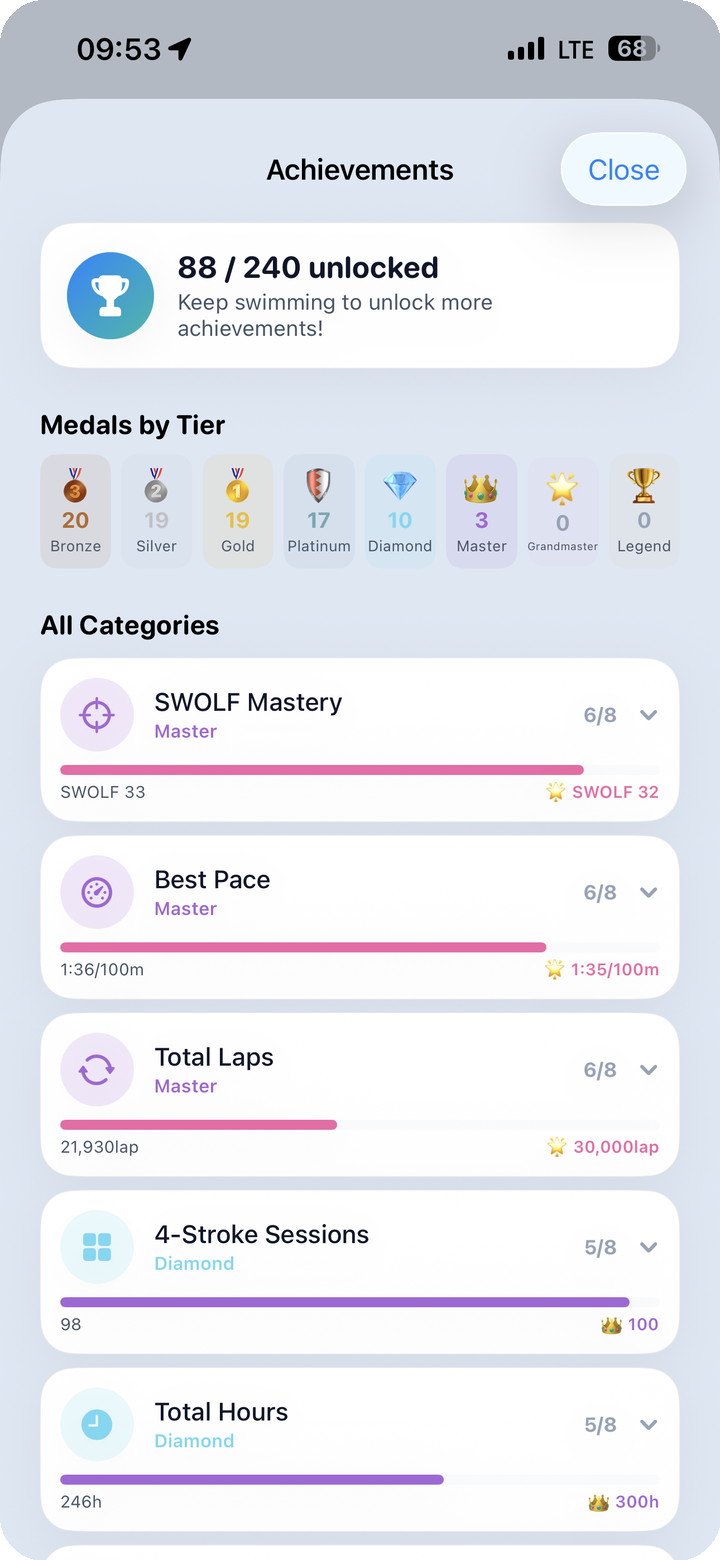
Tap the Achievements tab at the bottom of the app and the first thing you see is "n/240 unlocked" at the top of the screen. This is a live count of how many of the 240 achievements you have earned so far. If you are in your first week, it might be a single digit. If you have been swimming consistently for several months, it could be in the dozens. The rate at which this number moves depends on how often you swim — because achievements are built on cumulative records, frequent swimming naturally accelerates progress.
2.1 Medals by Tier — Your Grade Breakdown
Directly below the headline count is a Medals by Tier section. It groups your unlocked medals by their grade level, giving you a quick read on where your collection is concentrated.
The eight tiers, in ascending order, are:
| Tier | |
|---|---|
| Bronze | entry level |
| Silver | |
| Gold | |
| Platinum | |
| Diamond | |
| Master | |
| Grandmaster | |
| Legend | highest |
If most of your medals cluster in Bronze and Silver, you are in the early phase. When Platinum and above start to appear, you are well into the mid-game. Legend is a long-term milestone in every category — something measured in years of swimming, not weeks.
2.2 All Categories — Progress Bars Per Category
Below Medals by Tier, the All Categories list shows each of the 30 categories with its own progress indicator. A label like "6/8" next to SWOLF Mastery means you have cleared six of the eight tiers in that category.
Confirmed category examples include:
- SWOLF Mastery — cumulative sessions with SWOLF held below a target threshold
- Best Pace — personal-best times for 100m pace
- Total Laps — lifetime lap count
- 4-Stroke Sessions — sessions that include all four strokes
- Total Hours — total accumulated workout time
Other categories track things like dawn swims (before 5 a.m.), consecutive attendance days, and cumulative time spent in specific heart-rate zones. The full list spans the range of what a dedicated swimmer might care about over months and years.
2.3 The 30 × 8 Structure in Practice
The architecture is straightforward: 30 different swim metrics, each tracked to eight levels of depth. Reaching Legend in any one category takes a long time. But Bronze — the first tier — is often reachable in your first week. Low floor, distant ceiling.
What this produces is a reliable sensation: there is always a "n more to the next tier" within reach. Thirty categories running in parallel means that even on a week when one metric stalls, others are moving. Something is always in progress somewhere.
3. The Streak Bonus and How Coins Accumulate
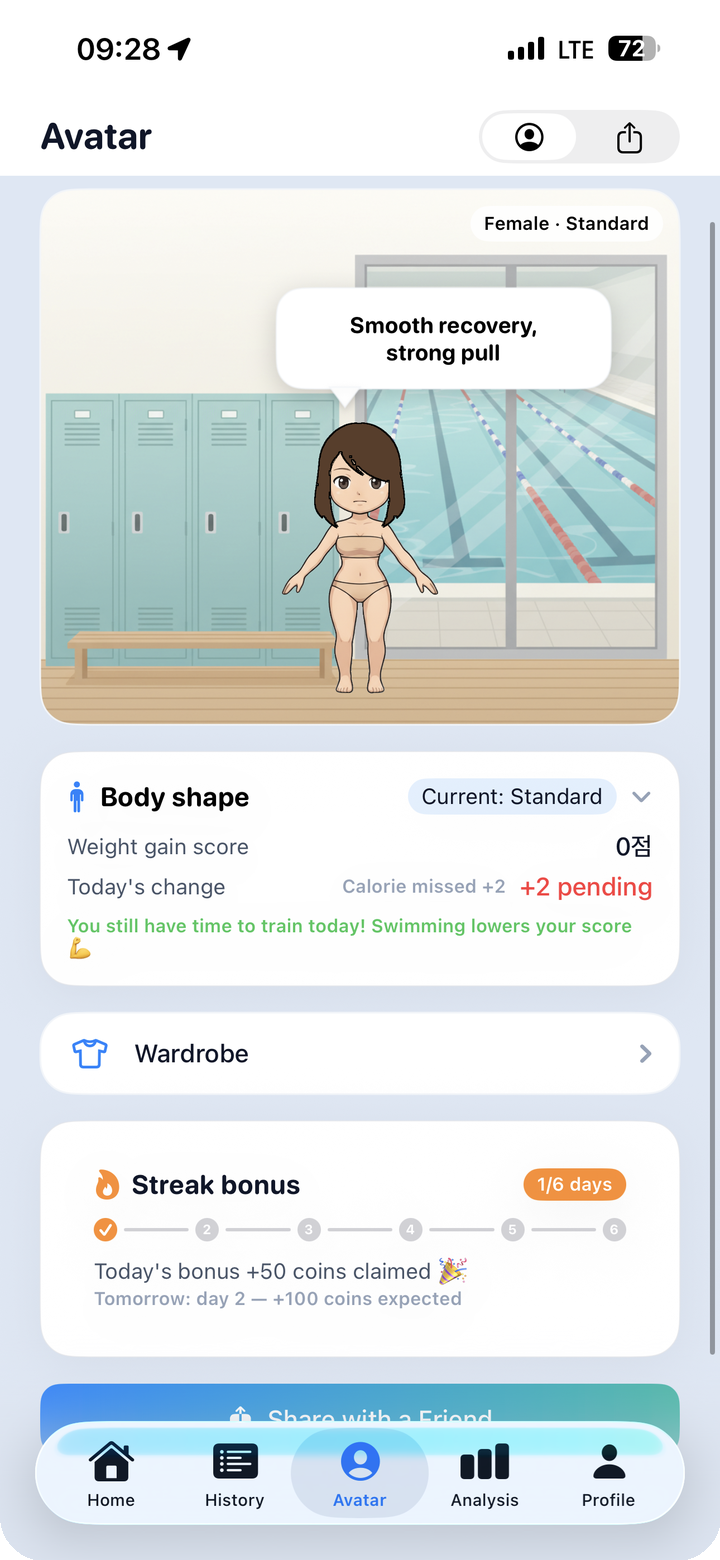
The Avatar tab sits alongside Achievements in the bottom navigation. The first thing you see is a character standing against a locker room background, with a motivational quote in a speech bubble. Scroll down and two key features appear.
3.1 The Body Shape Card
The Body Shape card reflects your recent training volume. It shows indicators like a Weight gain score alongside the character's current physique — lean when you have been swimming regularly, slightly rounder after an extended break. The framing is neutral and observational rather than judgmental. There is no "you'll get fat if you skip today" messaging.
3.2 Streak Bonus
The Streak Bonus panel tracks consecutive days you open the app. It is displayed as n/6, showing how many days of the current streak you have logged. Opening the app on a given day awards coins immediately — shown as something like "+50 coins today" — and the following day's preview shows a higher amount. The longer the streak, the more coins each daily check-in yields.
The streak system is intentionally low-stakes. A missed day resets the counter, but there is no penalty. You simply start over the next day. The incentive runs one direction only: rewards for showing up, not punishment for staying away.
3.3 What Coins Are For
Coins collected through the streak bonus (and through workout completions more broadly) fund draws in the Wardrobe. There is no mechanism to purchase coins with money — coins are earned through swimming and using the app. That boundary is firm.
3.4 Share With Friends
At the bottom of the Avatar screen is a Share the App button. If you want to pass the app along to a lane partner or a friend from your swim club, this button generates a shareable link in one tap.
4. Spending Coins in the Wardrobe — Categories, Draws, and Recombine
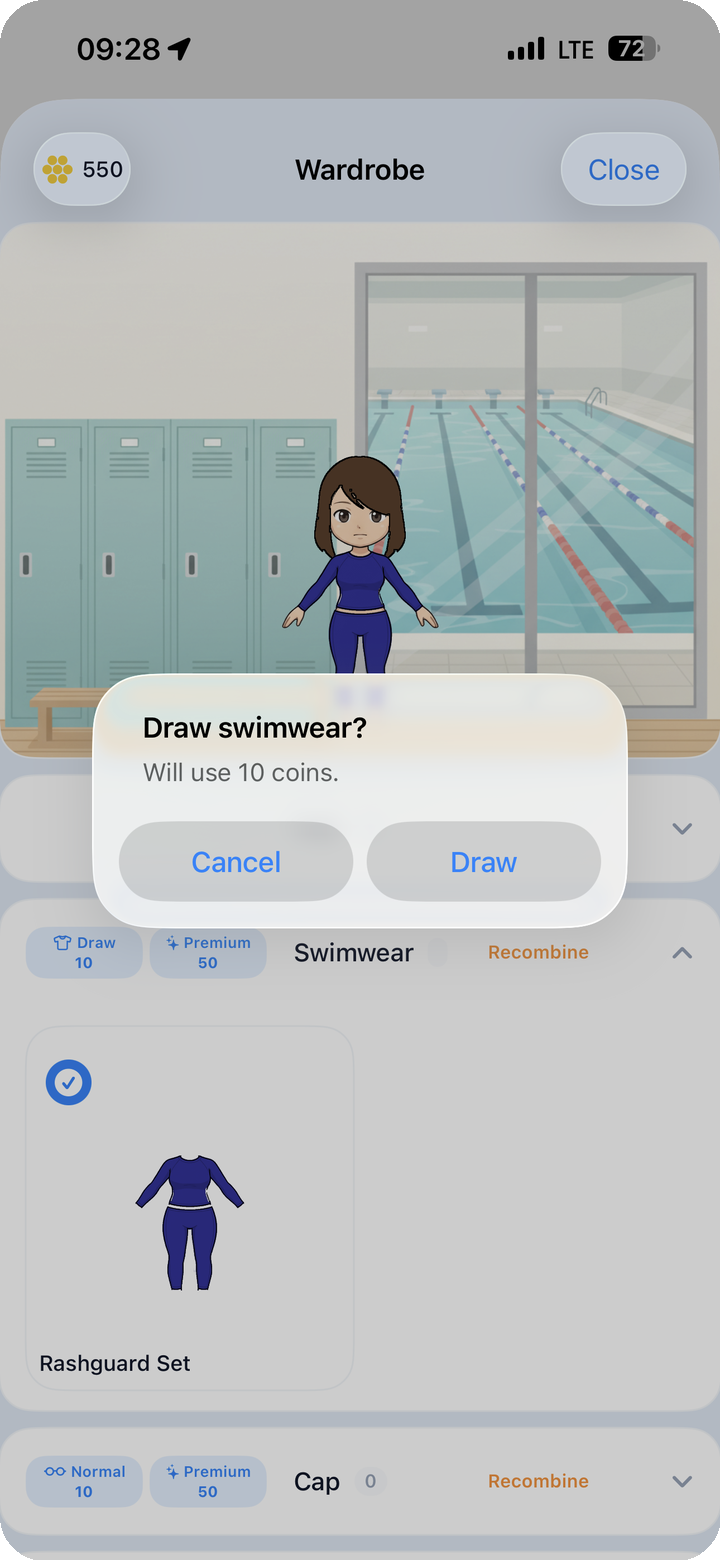
The Wardrobe is accessed from the Avatar tab. Your current coin balance is displayed at the top of the screen, with category tabs arranged below it.
4.1 Item Categories
The Wardrobe is organized into the following categories:
- Hair — hairstyles
- Swimwear — swimsuits (separates, one-piece, and more)
- Cap — swim caps
- Goggles — goggles
- Watch / Accessories — wrist items
- Tools — kickboard, pull buoy, fins, and similar gear
- Background — the scene behind your avatar
Tapping any category brings up the items you already own alongside the draw options for that category.
4.2 Standard Draw and Premium Draw
Each category offers two draw grades.
- Draw (standard): the lower-cost option. A swimwear standard draw costs 10 coins, for example.
- Premium: requires more coins but raises the odds on rarer items. A premium draw runs around 50 coins as an example.
Pressing the draw button triggers a confirmation dialog — "Draw swimwear? Will use 10 coins." — that shows the category and exact coin cost before anything is deducted. This extra step prevents accidental draws and gives you a moment to reconsider before committing.
4.3 Duplicate Items and Recombine
If a draw produces an item you already own, the Recombine option becomes available. Rather than discarding duplicates outright, recombination converts them into something usable. This keeps the feeling of a wasted draw from creeping in: the coin was spent, but the outcome still has value.
4.4 How the Wardrobe Fills Over Time
The Wardrobe is not a screen you clear in a sitting. Coins accumulate gradually through swimming and daily check-ins, and the collection grows one draw at a time. You might focus on a specific category until you have a variety of options there, or spread draws across categories as coins allow. Either approach works, and having to choose is part of what makes opening the Wardrobe feel like more than just a slot machine.
5. When Consistency Pays Off — How the Three Systems Connect
Achievements, the streak bonus, and the Wardrobe gacha look like separate features, but they function as a single loop.
You swim → session data accumulates → category progress advances → coins are awarded → you draw in the Wardrobe → your avatar changes → and the next swim carries a slightly different kind of anticipation. When the loop runs well, the app becomes part of the reason you keep swimming rather than just a place to log that you did.
To ground this in concrete terms: if someone has reached 88 out of 240 achievements and is sitting on 520 coins (demo figures), they have cleared several tiers across a good portion of the 30 categories, and they have enough coins to run a handful of Wardrobe draws. At that point, opening the app to see which categories ticked forward after a session becomes a habit that forms on its own.
At one month, the Achievements count looks different from day one. At six months, some categories start crossing into Gold and beyond. Legend is years away in every category — that distance is precisely what keeps the system from feeling finished.
For the design principles behind these systems and the "motivation without coercion" philosophy, see Post 04 — 240 Medals & the Six-Stage Avatar.