What you'll learn - Check body shape changes and attendance bonuses on the Avatar tab. - See how coins are earned, and how many you can expect. - Jump to the wardrobe and share segments.
1. Why the avatar exists
The avatar in Finns SwimLog isn't just a costume doll. Your character's body shape shifts a little depending on whether you swam today, and opening the app regularly earns coins. It's a "skip it and it shows, do it and you're rewarded" loop designed to keep you swimming.
2. Where to open
Tap the bottom tab Avatar. At the top there's a two-way Avatar / Share segment that switches between the avatar screen and the share screen inside the same tab.
Turning on Hide avatar menu in Settings removes this tab entirely, so check Settings first if you don't see it.
3. Avatar home screen
Open Avatar home and you'll see your character standing in a locker-room background, followed by a body-shape card, an attendance-bonus card, and a button into the wardrobe.
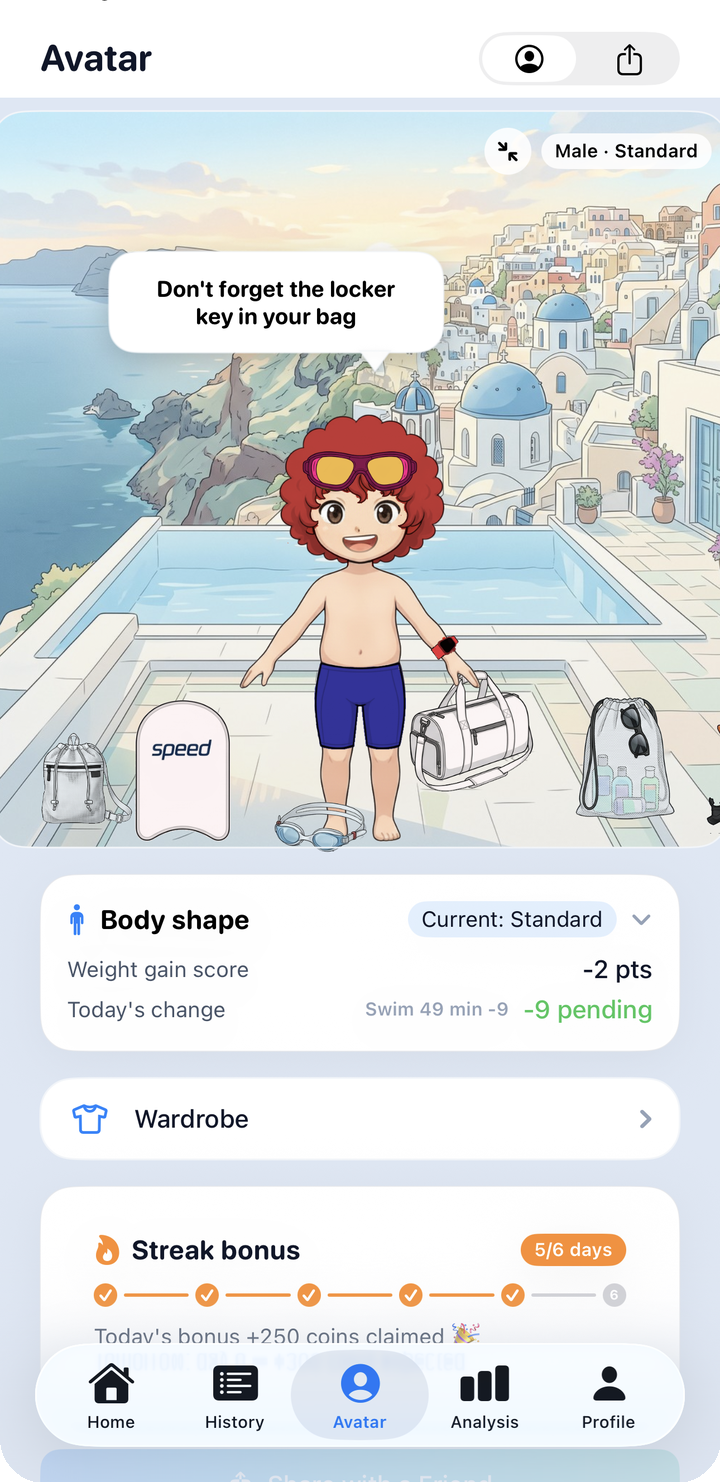
What to look for on this screen: - The character at the top: the base image is decided by gender and body shape (there's no separate skin-tone picker). - The Body shape card: shows your current body-shape step and today's score change. - The Streak bonus card: shows progress through the 6-day coin cycle. - Scroll further and you'll reach the wardrobe entry button, then "Share with a Friend."
3.1 Body shape — six automatic steps
Body shape isn't something you pick like an outfit — it changes automatically based on recent swim activity. Internally the app tracks a daily "weight gain score" and shows whichever body shape matches that score range.
There are six steps in order: Athletic → Slim → Standard → Cuddly → Chubby → Big Guy. Swimming often and long pushes the score down toward Athletic; skipping days pushes it up toward the heavier end. For the first 7 days after creating your character, the score doesn't accumulate at all, so body shape won't swing wildly right away.
The Body shape card shows both Weight gain score and Today's change side by side, so you can see exactly how today's swim affected the score.
3.2 Attendance bonus
You have to tap "claim" on the Streak bonus card once a day to actually receive coins — it isn't automatic. Complete a 6-day cycle and the payout grows each day, as shown below.
| Day | 1 | 2 | 3 | 4 | 5 | 6 |
|---|---|---|---|---|---|---|
| Coins | 50 | 100 | 150 | 200 | 250 | 300 |
Finish all 6 days, or miss a single day, and the next day restarts at day 1. The button reads "Day {day} today — claim +{coins} coins," and on the final day you'll see "6-day cycle complete! Restarts tomorrow ✨."
This is the same screen as #143, scrolled further down — the full streak-bonus card plus the "Share with a Friend" button beneath it. Tapping that button opens the standard iOS share sheet.
3.3 How to earn coins
There are only four real ways to earn coins.
| Method | Coins | Condition |
|---|---|---|
| Creating your character | 500 | Once only |
| Attendance streak | 50–300 | Once a day, manual claim |
| Workout bonus | 50 | Auto-granted once a day if you swim 30+ minutes total |
| App update bonus | 300 | Once per version update |
There is no way to buy coins with cash. These four methods are the only sources.
4. Wardrobe · Share
- Enter the wardrobe from the "Open wardrobe" button on Avatar home → Wardrobe & gacha
- Tap Share in the top segment to switch screens → Share
Next: Wardrobe & gacha